Account overview
View positions and P&L from multiple accounts on the same page. Each position retains its account source and links to its details.
MULTI-ACCOUNT PORTFOLIO TRACKER
View positions, assets and P&L from supported exchanges, brokerages and public addresses. Available on iPhone, iPad, Apple Watch and Mac.
The free plan supports one account. Multiple accounts, automatic sync and Apple Watch require FAST or Founders Edition.


View positions and P&L by account or across multiple accounts.
View positions and P&L from multiple accounts on the same page. Each position retains its account source and links to its details.
FAST automatically syncs connected accounts. The free plan supports manual refresh. Data coverage and update frequency depend on the provider.
Use the full interface on iPhone and iPad, check markets and positions from the Mac menu bar, and view selected accounts on Apple Watch.
Use read-only exchange connections or track a public address. Brokerage connections depend on account eligibility and provider authorization.
View positions and P&L from supported spot and futures accounts. Available account types vary by platform.
View asset balances on supported networks using a public address. No private key or seed phrase required.
The app offers Schwab and Futu connection options. Availability depends on account eligibility and provider authorization.
Tiger Brokers and Longbridge: planned
Connection availability, data coverage and sync frequency vary by platform and plan. Check the app for your account's available options.
The Mac menu bar shows your watchlist, positions, cost basis and P&L. Open the main window for more account details.


Positions and P&L · interface detail
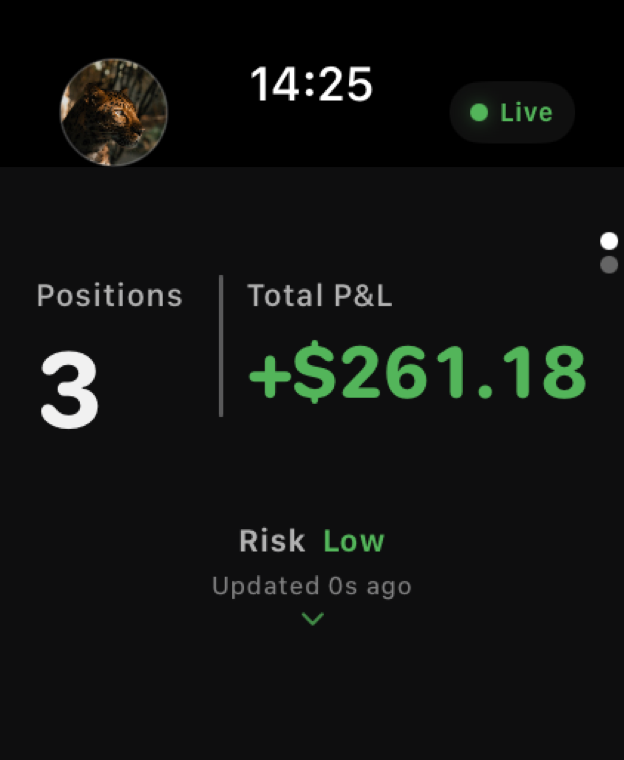
View accounts and positions selected on iPhone, including position counts, total P&L and individual position details. The Apple Watch app is included with FAST and Founders Edition.
We check permissions before saving a connection. If a credential can trade, transfer or withdraw, TickPro rejects it. Credentials are encrypted in transit and at rest.
TickPro can read positions and account data. It can't place orders or move funds.
We check provider permissions before saving a connection and reject known write access.
Credentials are encrypted while they travel and while they are stored on the server.
We don't sell personal or account data, and we don't use it to target ads.
Remove an account from TickPro and we stop accessing it.
The free plan supports one account and manual refresh. FAST includes up to 10 accounts, automatic sync, 90 days of history and Apple Watch. Founders Edition is available by application and invitation.
Download TickPro for iPhone and iPad. Availability varies by App Store region.
Download on the App Store